Body – Left Menu WYSIWYG
Add body with a left hand section navigation menu
How to use
- Add the Body content. This is a WSYIWYG area, see WYSIWYG Content options
Recommendations for usage:
- Use the body - left menu WYSIWYG content type directly after a hero
- Use only on pages which are set to show in navigation
- Only 1 body - left menu WYSIWYG content item can be can be added per page
- Not suitable for use on pages at level 2 of the site structure (child pages of the homepage)
Left Menu Display
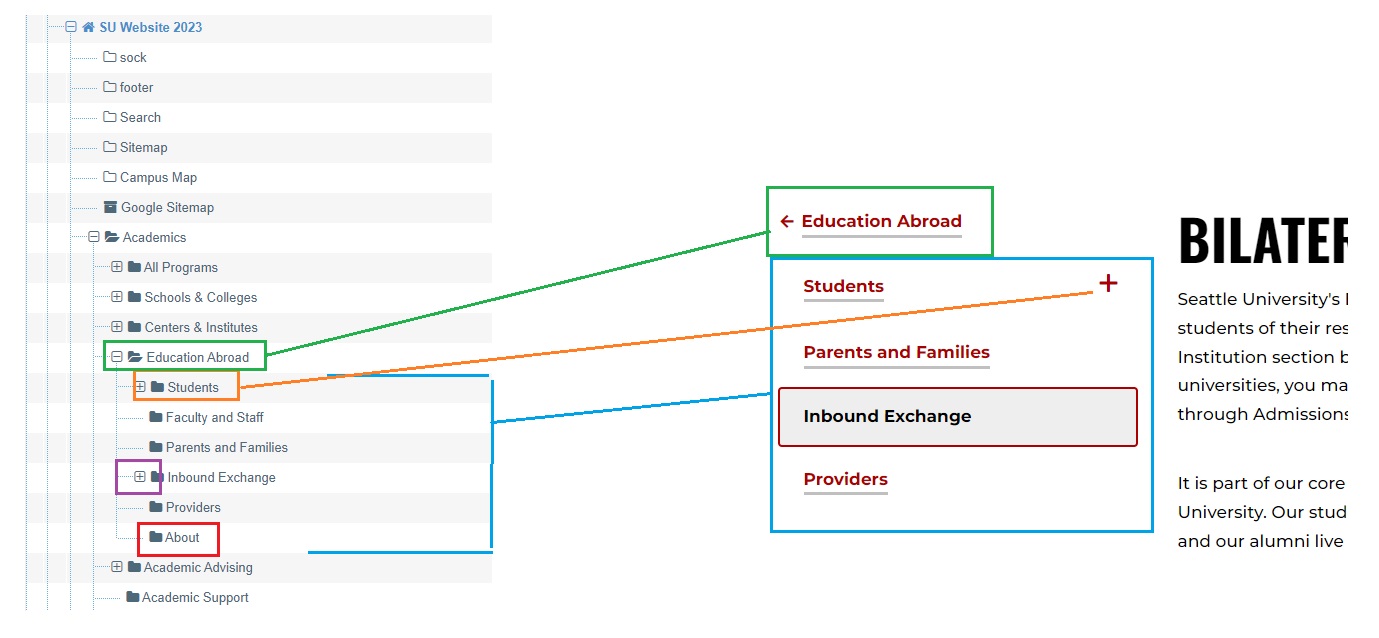
The menu displays a link to the parent page, followed by links to peer pages. If a peer page has children, links will display in an expandable panel.
See in the following annotated screenshot of the left menu for an example page in the component library and the site structure where:
- Green is the current section, this page
- Blue is the parent page
- Red is a peer page
- Purple is a peer page which has child pages. Here the expandable panel has been opened to show the child links. When the page loads if the current page has children the expandable panel is open, other expandable panels are closed.
- Orange is a peer page set to not show in navigation and does not display in the menu
Content Type Details
ID: 7265
Name: Body – Left Menu WYSIWYG
Description: This component allows placement of body content within the flexible components area of a page and a dynamic left-hand side navigation menu.
Minimum user level: Contributor
Content Type Elements Details
| Name | Description | Size | Type | Required |
|---|---|---|---|---|
| Name | The Name Element | 80 Characters | Plain Text | Yes |
| Heading | Add a heading, for example, “Frequently Asked Questions” (creates an H2 heading). | 250 Characters | Plain Text | No |
| Body | Main content within a WYSIWYG | 99999 Characters | HTML | Yes |
| Accordion 1 - Title | Title of the accordion | 150 Characters | Plain Text | No |
| Accordion 1 - Body | The main content within a WYSIWYG | 99999 Characters | HTML | No |
| Accordion 2 - Title | Title of the accordion | 150 Characters | Plain Text | No |
| Accordion 2 - Body | The main content within a WYSIWYG | 99999 Characters | HTML | No |
| Accordion 3 - Title | Title of the accordion | 150 Characters | Plain Text | No |
| Accordion 3 - Body | The main content within a WYSIWYG | 99999 Characters | HTML | No |
| Accordion 4 - Title | Title of the accordion | 150 Characters | Plain Text | No |
| Accordion 4 - Body | The main content within a WYSIWYG | 99999 Characters | HTML | No |
| Accordion 5 - Title | Title of the accordion | 150 Characters | Plain Text | No |
| Accordion 5 - Body | The main content within a WYSIWYG | 99999 Characters | HTML | No |
| Accordion 6 - Title | Title of the accordion | 150 Characters | Plain Text | No |
| Accordion 6 - Body | The main content within a WYSIWYG | 99999 Characters | HTML | No |